
Managed vs co-managed IT in Omaha: which fits your business
Fully managed IT means Cambium Data becomes your IT department; co-managed IT means your IT person keeps the job and we take the pieces they want help with. If nobody in your building owns IT, choose fully managed; if you have an IT person worth keeping, choose co-managed. Pricing for both is on our managed IT page.

Both models cover the same technology. The difference is who owns it day to day, who your staff call, and how the work is split. This page lays the two side by side so you can pick the right one before you talk to anyone, including us.
The two models in plain terms
Fully managed IT
We are your IT department. Your team calls us, and we handle the computers, Microsoft 365, security, backup and vendors. A good fit if nobody in the building owns IT today.
Co-managed IT
Your IT person keeps the job and the projects. We take the pieces they want off their plate, like help desk overflow, patching and backup checks. You decide the split, and we write it down.
Managed vs co-managed IT, side by side
| Topic | Fully managed IT | Co-managed IT |
|---|---|---|
| Who owns IT day to day | Cambium Data | Your IT person, with Cambium Data on the pieces you hand us |
| Who your staff call | Our help desk | Your IT person first, or our help desk for the work you’ve handed us |
| Microsoft 365, security and backup | We handle them | Split the way you choose, such as patching and backup checks on our side |
| Projects | We plan them with you; projects and hardware are quoted separately | Your IT person keeps the projects; we help when asked, quoted separately |
| Who decides what | You and Cambium Data, in a regular planning sit-down | You and your IT person, with the split written down |
| Best fit | No one in the building owns IT today | You have an IT person you want to keep |
Full details, including pricing, are on our managed IT services page.
Who fully managed IT fits
- Nobody owns IT today. The office manager, the owner or the most patient employee handles it between real work.
- Your IT person is leaving. A retirement or resignation is a good time to decide whether to rehire or hand IT to a team.
- You want one number to call. Computers, Microsoft 365, security, backup and the vendor calls all go to the same place.
- You’ve outgrown “good enough.” More people, a second location or a cyber insurance questionnaire has shown gaps nobody has time to close.
Who co-managed IT fits
- One IT person doing everything. They know your business well, but password resets and patching eat the time they need for projects.
- No backup when your IT person is out. Vacations, sick days and nights shouldn’t leave your business without help.
- Your team wants to keep the projects. Your IT person stays in charge of strategy and big changes, and hands us the routine work.
- A parent company or a department with its own IT. Your local office needs hands and help desk support that fits around the people already in charge.
Co-managed IT doesn’t mean replacing anyone. Your IT person keeps the role, and we take the parts they want help with. We write down who owns what, so nothing falls between the two of us.
What each model costs
We keep pricing for both models in one place: our managed IT page. If you’d rather talk it through, the free technology and AI review shows which model fits your business and what it would cover.
Three questions that settle it
- 1
Who in your building owns IT today?
If the honest answer is “nobody” or “whoever is free,” fully managed IT is usually the better fit.
- 2
What happens when that person is out?
If the answer is “we wait,” co-managed IT gives them backup without replacing them.
- 3
How much of the work does your IT person want to keep?
If they want the projects and decisions but not the routine work, that’s the co-managed split. If they’d rather hand off everything, it’s fully managed.
Many businesses change models when their staff changes. If that happens, we look at it with you and write down the new split.
Downloads
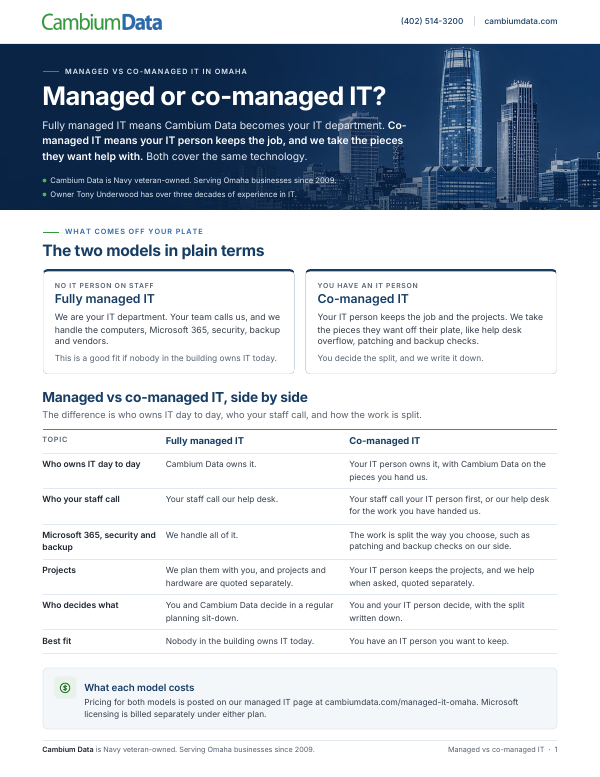
Managed vs Co-Managed IT
This guide compares fully managed and co-managed IT, including who handles day-to-day IT, security, Microsoft 365, backup and projects under each model.
Download the PDFNot sure which fits? Start with a free technology and AI review
We look at your setup and what you pay today, and show you what isn’t protected and what we’d fix first, in plain English, and if you have an IT person, who would do what under each model. It’s free, there’s no obligation, and you keep the written summary.
You can also call Cambium Data at (402) 514-3200 or visit us at 6542 S 118th St, Omaha, NE 68137.
Managed vs co-managed IT questions
What is the difference between managed and co-managed IT?
With fully managed IT, an outside IT company becomes your IT department and your staff call it for everything. With co-managed IT, your own IT person keeps the job and the projects, and the IT company takes the pieces they want off their plate, like help desk overflow, patching and backup checks. Cambium Data offers both in Omaha and writes down the split.
How much does managed IT cost with Cambium Data in Omaha?
Pricing for both fully managed and co-managed IT is posted on Cambium Data’s managed IT page, which is the one place we keep it. If you want to know what your business would actually need, the free technology and AI review looks at your setup and, after your call is scheduled, your recent bills. We explain which model fits your business in plain English, with no obligation.
Do we have to get rid of our IT person to work with Cambium Data?
No. Co-managed IT is built for businesses that want to keep their IT person. Your IT person keeps the role and the projects, and Cambium Data takes the parts they want help with, such as help desk overflow, patching and backup checks. We write down who owns what, so nothing falls between your person and our team.
Is fully managed or co-managed IT better for a small business?
It depends on who owns IT today. If nobody in the building does, or the job falls to the office manager or owner, fully managed IT is usually the better fit. If you have an IT person you want to keep who needs backup or more time for projects, co-managed IT gives them help without replacing them.
Is Microsoft licensing included in managed or co-managed IT?
No. Microsoft licensing is not included in either Cambium Data plan. You pay for your Microsoft 365 licenses separately, and the managed or co-managed rate covers the IT work around them. Current pricing for both plans is on our managed IT page, and the free technology and AI review shows which plan fits your team.
Can we switch from co-managed to fully managed IT later?
Many businesses change models when their staff changes, for example when an IT person retires or leaves. If that happens with Cambium Data, we look at it with you and write down the new split, whether that means taking over everything or handing more of the work back to a new hire.
Where to go next
Managed IT services in Omaha
What fully managed and co-managed IT include, and full pricing.
Cybersecurity
The security work behind both models.