
IT services for Omaha healthcare practices
Cambium Data is an Omaha IT company that supports independent and small-group healthcare practices: clinics, dental offices, therapy, chiropractic and behavioral health providers. We keep the EHR access, front-desk phones, workstations, network and tested backups underneath your practice software working, and we work with your software vendor and compliance advisor so your office manager doesn’t have to.

A practice runs on a few things that all have to work at once: the EHR or practice software, the phones at the front desk, and the computers in the rooms. When one of them stops, patients wait, staff improvise, and the day gets away from you. Most independent practices don’t have a hospital IT department behind them, so that problem usually lands on the office manager.
We look after that technology so your staff can keep seeing patients, and we tell you in plain English what’s in place and what isn’t.
Find the page for your practice
Medical offices and clinics. EHR access, exam room and front desk workstations, and backup internet.
For dental offices, this includes imaging and practice software, operatory computers, and handoffs with your software vendors.
Nonprofit clinics and treatment providers. Also see IT support for Omaha nonprofits for Microsoft’s nonprofit licensing.
If you run a chiropractic, therapy, behavioral health, eye care or other practice, this page covers what nearly every practice has in common.
Practices we work with
We work with independent and small-group practices that have no IT department, or one IT person who needs backup. That includes:
- Family, primary care and specialty clinics
- Dental offices
- Chiropractic offices
- Physical, occupational and speech therapy practices
- Behavioral health, counseling and treatment providers
- Optometry and eye care practices
Each has its own software and equipment, but the questions underneath are the same: can staff get into the system, can patients get through on the phone, and can you get your data back if something goes wrong.
The problems most practices share
Whatever the specialty, these come up in almost every practice we talk to.
Practice software that has to be reachable all day
Even when your EHR or practice management software is hosted in the cloud, it still depends on your internet line, your Wi-Fi, the browsers and workstations staff use, and sometimes a local server or interface. We look after everything underneath the software. When a problem falls between your vendor’s product and your hardware, we work it out with the vendor so your office manager isn’t stuck relaying messages. Clinic detail is on our medical offices page.
The front desk: phones and devices
Missed calls at the front desk turn into frustrated patients. We set up cloud-based phone systems with call routing for scheduling, billing and after-hours, port your existing numbers so you keep them, and add phone apps for staff who move around the office. We also keep the front-desk devices running, like card readers and printers, because a check-in line stalls when one of them stops. See network and phone support.
Imaging, exam equipment and the network they sit on
Imaging and exam equipment often needs its own computer, specific drivers and its own part of the network. Patient Wi-Fi stays separate from the network your staff and practice software use, and equipment that can’t be updated is kept apart where the equipment allows it. We install and manage business-grade firewalls, switches and Wi-Fi, including Cisco and Meraki equipment, which we sell and support. Dental imaging detail is on our dental offices page.
Microsoft 365, email and staff accounts
Every staff member gets their own login instead of a shared one, with multi-factor authentication and email filtering on top. We keep licensing clean and remove access the day someone leaves. Microsoft keeps deleted items for a limited time, which isn’t the same as a backup you control, so we back up Microsoft 365 email and files too.
Backups that have been tested
We back up any on-site server, your shared files and Microsoft 365, keep a copy off-site, and run regular test restores so we know the backup actually brings data back. We also help you write a short downtime plan, so the front desk knows how to keep checking patients in if the internet or a server goes down.
Cyber insurance questions
Renewal applications ask about multi-factor authentication, backups, endpoint protection and email security. Our Cyber Insurance Readiness help walks through the technical questions with you and puts missing controls in place. We don’t sell insurance, and your insurer decides what’s covered.
More than one location, or staff working off-site
Groups with more than one location need every site set up the same way and one view of the whole network. Staff who work from home or see patients by video need encrypted laptops and secure remote access. We set both up and manage them from one place, so every site and every remote provider gets the same help desk.
Patient information: who does what
For medical and dental offices, we help put the technical safeguards HIPAA calls for in place and keep them maintained, alongside your compliance advisor.
Your compliance advisor owns the policies and the paperwork. We put the technical controls in place, keep them maintained, and tell you in plain English what’s in place.
We handle
- Multi-factor authentication
- Encryption
- Endpoint protection
- Email filtering
- Backups and test restores
- Removing access when staff leave
Your compliance advisor handles
Policies and paperwork
AI employees that give your front office time back
AI employees take repetitive office work off your staff: drafting vendor and supply follow-ups, sorting job applicants, sorting the shared inbox, and drafting review requests and staff schedule reminders. Your front office gets more done, and the day runs more smoothly. Your people approve anything that goes out.
They start with non-patient office work. Patient information stays out unless a signed agreement with the AI provider covers it and we both agree in writing. We also write a plain-language AI use policy so staff know which AI tools are approved.
Fully managed or co-managed
Practices with no IT person usually want fully managed IT: we become your IT department, and staff call us for everything. Groups that already have an IT person, or a parent organization with its own IT team, can use co-managed IT: your person keeps the job, and we take the pieces they want off their plate. We aim to respond to critical issues within 1 hour, high priority issues within 4 business hours, normal requests within 1 business day and low priority requests within 3 business days.
See managed IT in Omaha for how each model works, or read managed vs co-managed IT to compare them side by side.
Questions to ask before you choose a healthcare IT provider
Whoever you hire, these five questions tell you a lot. Here’s how we answer them.
Who calls our EHR or software vendor when something breaks, and who follows up? We do, and we stay on it until it’s fixed or clearly in the vendor’s hands.
When was our last test restore, and what did it bring back? We run test restores on a schedule and can tell you the date and what we restored.
Who removes access the day someone leaves the practice? We do, from the same checklist every time, so no account sits open.
How does the front desk keep working if the internet or a server goes down? A backup internet line where it makes sense, and a short written downtime plan staff can follow.
Who owns our compliance paperwork, and what will the IT provider actually put in place? Your compliance advisor owns the paperwork. We put the technical controls in place, keep them maintained, and tell you what’s there.
Downloads
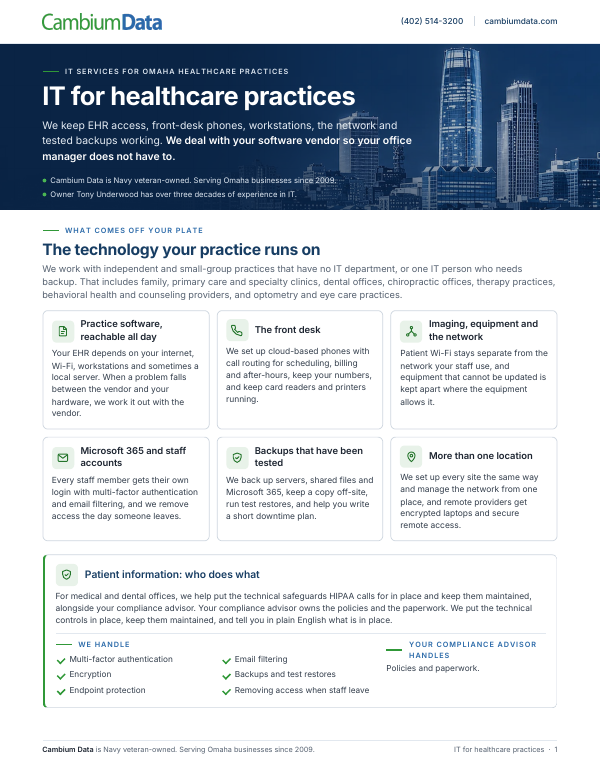
IT for Healthcare Practices
This guide explains how Cambium supports healthcare practices with EHR access, Microsoft 365, phones, backups, patient Wi-Fi, multi-location setups and technical HIPAA safeguards.
Download the PDFStart with a free technology and AI review
We look at your setup and what you pay today, and show you what isn’t protected and what we’d fix first, in plain English. For a practice, we also look at how the front desk would keep working if the internet or a server went down. It’s free, there’s no obligation, and you keep the written summary.
If your cyber insurance renewal is coming up, see Cyber Insurance Readiness.
You can also call Cambium Data at (402) 514-3200 or visit us at 6542 S 118th St, Omaha, NE 68137.
Healthcare IT questions
What kinds of healthcare practices does Cambium Data support in Omaha?
Cambium Data supports independent and small-group healthcare practices in Omaha that don’t have a hospital IT department behind them. That includes family and specialty clinics, dental offices, chiropractic offices, therapy practices and behavioral health providers. If you aren’t sure your practice fits, a free technology and AI review is an easy way to find out what you have and what needs attention first.
Does an IT company replace our EHR or practice software vendor?
No. Your EHR or practice software vendor still supports the application itself. Cambium Data supports what it runs on: the computers, network, internet, staff accounts and backups. When a problem falls between the software and your hardware, we work it out with the vendor directly, so your office manager isn’t stuck relaying messages between two support lines.
Who handles the compliance side for a medical or dental practice?
For medical and dental offices, we help put the technical safeguards HIPAA calls for in place and keep them maintained, alongside your compliance advisor. Your compliance advisor owns the policies and paperwork. Cambium Data puts the technical controls in place, such as multi-factor authentication, encryption, endpoint protection and tested backups, keeps them maintained, and tells you in plain English what’s in place.
Can Cambium Data support a practice with more than one location?
Yes. Cambium Data sets up each location of a practice the same way and manages the network for every site from one place. Staff at each location call the same local help desk and get help from people who already know how the practice is put together. That keeps a second or third office from turning into its own IT project.
Can an IT company help with our cyber insurance application?
Yes. Cyber insurance applications ask about multi-factor authentication, backups, endpoint protection and email security. Through Cyber Insurance Readiness, Cambium Data goes through those technical questions with your practice and helps put anything missing in place before renewal. We don’t sell insurance, and your insurer decides what’s covered, but you’ll know what’s actually set up when you answer.
Can our staff use AI without putting patient information at risk?
Yes. AI employees start with non-patient office work, like vendor follow-ups, job applicants and staff schedule reminders, and your people approve anything that goes out. Patient information stays out unless a signed agreement with the AI provider covers it and we both agree in writing. Cambium Data also writes a plain-language AI use policy that says which AI tools staff can use.
What is Cambium Data’s free technology and AI review?
The free technology and AI review starts with a short call and a quick look at your setup. After the call is set up, we ask for your recent internet, phone, Microsoft 365 and IT bills. Cambium Data comes back with what isn’t protected and what we’d fix first, in plain English. It’s free, there’s no obligation, and you keep the written summary whether or not you hire us.
How we cover a practice across our four services
Managed IT
Help desk, monitoring, patching scheduled outside clinic hours, workstation replacement planning, calls to your software vendors, backups and test restores. Fully managed or co-managed. Day-to-day help is covered under IT support and computer support.
Networking
Firewalls, switches and Wi-Fi, with patient Wi-Fi kept separate. Cisco and Meraki equipment we sell and support. Cloud-based phones with number porting and apps, business internet and backup lines, and security cameras. We plan and deliver cabling projects.
Cybersecurity
Multi-factor authentication, email security, endpoint protection, encrypted laptops, automated penetration testing (quoted separately), and Cyber Insurance Readiness.
AI employees that take the office busywork off your staff
They draft vendor and supply follow-ups, sort job applicants, and prepare review requests and staff schedule reminders, so the front office gets more done. They start with non-patient office work. Your people approve anything that goes out. See how AI employees work.