
Managed IT services and IT support in Omaha from a local managed service provider (MSP)
Full IT support when you want us to handle it. Co-managed support when you want to keep your IT person.
Managed IT, plus AI employees. Add AI employees whenever you’re ready.
- Founded 2009
- Local managed service provider (MSP)
- Navy veteran-owned

Fully managed or co-managed IT
Take it all over, or back up the IT person you already have.
Fully managed IT
We are your IT department. Your team calls us, and we handle the computers, Microsoft 365, security, backup and vendors. A good fit if nobody in the building owns IT today.
Co-managed IT
Your IT person keeps the job and the projects. We take the pieces they want off their plate, like help desk overflow, patching and backup checks. You decide the split, and we write it down.
If you already have an IT person and want a clear split of duties, see managed vs co-managed IT.
Day-to-day IT support and computer support
IT support for Omaha businesses: one local number to call, and a person who already knows your setup.
Help desk
Phone and email help for every user, including printers, Wi-Fi and the slow-computer calls.
Computer support
Desktops and laptops set up for new hires, fixed when something breaks, and planned for replacement before they get too old to trust.
New hires and departures
Accounts set up for new people and shut off when someone leaves, so access does not sit open.
Vendor calls
We handle the calls to your internet provider and the software your office runs on.
Written down
The setup is documented, so the answers are not stuck in one person’s head.
Mobile device management
Mobile device management (MDM) is part of managed IT. For Apple devices we use Addigy, so Macs, iPhones and iPads get their settings, updates and security the same way every time.
Current clients can call the support line at (402) 514-3210. If you’re new to Cambium, call (402) 514-3200.
IT support in Omaha from a managed service provider (MSP)
What happens when someone on your team needs help, and what an MSP does that a break-fix shop does not.
- 1
Ask for help
Your staff call the support line or email the help desk, and reach a local team that knows your setup.
- 2
Logged
Every request is written down, so nothing gets lost in one person’s inbox and you can see what was done.
- 3
Prioritized
A server that is down comes before a new monitor. Problems that stop work go to the front of the line.
- 4
Fixed
Most fixes happen remotely. When the problem needs hands, we schedule a visit to your office.
- 5
Written up
The fix goes into your documentation, and problems that keep coming back are flagged for a permanent fix at your next planning review.
A break-fix shop is paid when something breaks. A managed service provider (MSP) is paid a monthly fee to manage and maintain your technology, so monitoring, patching, backup checks and planning are part of the service, not extra calls. Comparing IT support providers? See what managed IT costs in Omaha and what should be included.
What we look after
The layer your business runs on. When it is solid, nobody has to think about it.
Microsoft 365
Accounts, licenses, email security, Teams and SharePoint, kept tidy. If yours has grown messy, we clean it up.
Endpoint protection and patching
PCs and servers patched on a schedule, with endpoint protection a person actually watches.
Backup
Backups we test by restoring, not just by checking that a job ran. Tested restores belong in the everyday plan, not only after an incident. See our backup and disaster recovery page.
Comprehensive security
Firewalls, multi-factor sign-in, endpoint protection and security awareness training (phishing simulations and training), managed across the business and documented to help answer cyber insurance questionnaires.
IT planning
We regularly review what is aging, what needs attention, and what to plan for next.
Servers, physical and virtual
We manage your servers, including virtualized servers on VMware and Hyper-V: the hosts, the virtual machines, patching and backups. Planning a new host or a move to Azure? See virtualization projects.
Hardware as a service
The equipment, for a monthly cost.
Get the PCs, servers and network gear your office needs for a monthly cost, instead of a large purchase up front. We set the equipment up and manage it with the rest of your IT, so there is one team to call when something breaks.
We put the equipment list and the monthly number in writing before you sign. Ask about hardware as a service during your free technology and AI review.
Pricing
What managed IT costs
Priced per user, per month, so the bill follows your user count. Choose the plan that matches how your office handles IT today. Both include comprehensive security, not a bolt-on.
No IT person on staff
Full Managed IT
We are your IT department. Your team calls us, and we own the computers, Microsoft 365, security, backup and vendors.
From$100per user / month
What is included
- Help desk for every user by phone and email, from a local team that knows your setup
- Comprehensive security: firewall management, multi-factor sign-in, and endpoint protection
- Security awareness training: phishing simulations and training, included with Full Managed IT
- Microsoft 365 administration: accounts, licenses, email security, Teams and SharePoint
- Monitoring and scheduled patching for PCs and servers
- Backups tested by restoring, not just by checking that a job ran
- New hires, departures and vendor calls handled for you
- Documentation and regular IT planning to keep your technology organized and prepared for what is next
10 users, fully managed$1,000 per month
10-user minimum, 1-year term
You have an internal IT person
Co-Managed IT
Your IT person keeps the job and the projects. We back them up with our tools, our team and a written split of who owns what.
From$50per user / month
What is included
- Our full tool stack for monitoring, patching, endpoint protection and backup
- Security awareness training: phishing simulations and training, included with Co-Managed IT
- Co-managed IT includes 0.25 support hours per user per month, with additional time billed in 15-minute increments at $150 an hour.
- Help desk overflow so your IT person can stay on projects
- A second set of hands on security incidents, outages and escalations
- A written responsibility split, reviewed as your team changes
10 users, with 2.5 support hours included$500 per month
10-user minimum, 1-year term
Support hours are 7 AM to 6 PM Central, Monday through Friday. Local team in Omaha since 2009
Security awareness training (phishing simulations and training) is included with Full Managed IT and Co-Managed IT. Non-managed clients can add it.
What changes the price
The plan rate covers the day-to-day. These are the things that move your number up, and we put every one of them in writing before you sign.
After-hours and weekend work
$225 an hour (time and a half) on both plans, in 15-minute increments. It never draws down co-managed included hours.
On-site visits
Scheduled time at your office for hands-on work, setups and walk-throughs.
More included hours
Co-managed teams that lean on us more can raise the hours built into the monthly rate.
Priority response
A faster lane for offices where a few minutes of downtime costs real money.
Add-ons like AI employees
AI employees for helpdesk triage, inbox sorting and office follow-up, priced on their own.
Projects and hardware
New equipment, office moves and larger upgrades are quoted separately, up front.
Prices are per user, per month. A 10-user minimum and a 1-year term apply to both plans. Microsoft 365 licensing is not included, and unused co-managed hours do not roll over.
Get your exact number
Book a free technology and AI review. We look at your setup, show you what is not protected and where AI employees could help, then put a written price in front of you, with no obligation.
Switching IT providers
Changing IT companies sounds like a headache. Here is what it looks like with us.
- 1
Network lookover
We look at your computers, network, backups, Microsoft 365 and security, and write down what we find. You keep it either way.
- 2
A written plan
What we would fix, in what order, and who does what if you keep an IT person on staff.
- 3
The handoff
We gather passwords, licenses and documentation, and work with your current provider on the handover.
- 4
Setup
Monitoring, patching, endpoint protection and backup on every machine, checked and working.
- 5
Go live
Your team gets the support number and a real person to call. We plan the switch so the business keeps running.
- 6
First sit-down
We go over what is fixed, what is next, and whether AI employees make sense for your office.
AI employees that take the busywork off your staff
They handle helpdesk triage, sort the owner’s inbox and draft office follow-ups, so your team gets more done in less time. Your people approve anything that goes out.
Add them to managed IT or start with them on their own. How AI employees work.

Why Cambium
- One local team for your IT, network, phones, internet, cameras, security and AI.
- No managed IT contract required for projects or hardware.
- Our managed IT pricing is posted right on our site, starting at $100 per user per month.
- We use AI employees in our own office to get more done in less time.
- Cambium was founded in 2009, and we are Navy veteran-owned.
- Support hours are 7 AM to 6 PM Central, Monday through Friday, and after-hours work is available.
Who you’re working with
A local Omaha company, not a call center. When you call, you get people who know your setup.
- Office
- Cambium Data
6542 S 118th St
Omaha, NE 68137
(402) 514-3200 - Founded
- 2009
- Owner
- Tony Underwood
- Service area
- Omaha and Lincoln areas
- Ownership
- Navy veteran-owned
Managed IT questions
What is a managed service provider (MSP)?
A managed service provider (MSP) looks after your technology for a monthly fee: help desk, monitoring, patching, security, backup and planning. Cambium Data is an MSP based in Omaha, serving businesses in the Omaha and Lincoln areas.
Is IT support the same as managed IT?
IT support is the help your staff get when something breaks or they have a question. Managed IT includes that support plus the work that prevents problems, like monitoring, patching, security, tested backups and planning. Fully managed IT includes help desk support for every user. Co-managed IT includes a set number of support hours that back up your IT person.
How does our team get IT support?
Clients call the support line at (402) 514-3210. Each request is logged, prioritized and handled by a local team that knows your setup, and we schedule an on-site visit when the fix needs hands.
Do you offer IT consulting without managed IT?
Yes. You can hire us for IT consulting, a project or hardware without a managed IT contract.
Do we have to get rid of our IT person?
No. Co-managed IT is built for that. Your IT person keeps the role, and we take the parts they want help with. We write down who owns what.
What does co-managed IT include?
Co-managed IT is priced from $50 per user per month, with a 10-user billing minimum. It includes 0.25 support hours per user per month, with additional time billed in 15-minute increments at $150 an hour. Unused hours do not roll over.
What does after-hours support cost?
After-hours support is $225 an hour, which is time and a half, on both fully managed and co-managed IT. After-hours time does not come out of the co-managed included hours.
What is the support number?
Clients call the support line at (402) 514-3210. For anything else, call (402) 514-3200. Support hours are 7 AM to 6 PM Central, Monday through Friday.
Is security awareness training included?
Yes. Full Managed IT and Co-Managed IT both include security awareness training (phishing simulations and training). Non-managed clients can add it.
Are AI employees part of managed IT?
No, AI employees are an add-on, so you can add them to managed IT or start with AI employees alone.
We are a dental or medical office. Can you help?
Yes. For medical and dental offices, we help put the technical safeguards HIPAA calls for in place and keep them maintained, alongside your compliance advisor. AI employees for healthcare offices start with non-patient office work.
How hard is it to switch providers?
We start with a look at what you have, give you a written plan, and handle the handoff with your current provider. You keep the notes either way.
Where are you located?
Cambium Data, 6542 S 118th St, Omaha, NE 68137. We serve businesses in the Omaha and Lincoln areas. Cambium was founded in 2009 and is Navy veteran-owned.
One team for all of it
Your IT, network, Cisco gear, phones, internet, security and AI, handled by one local team. Not sure where to start? Get a free technology and AI review.
Downloads
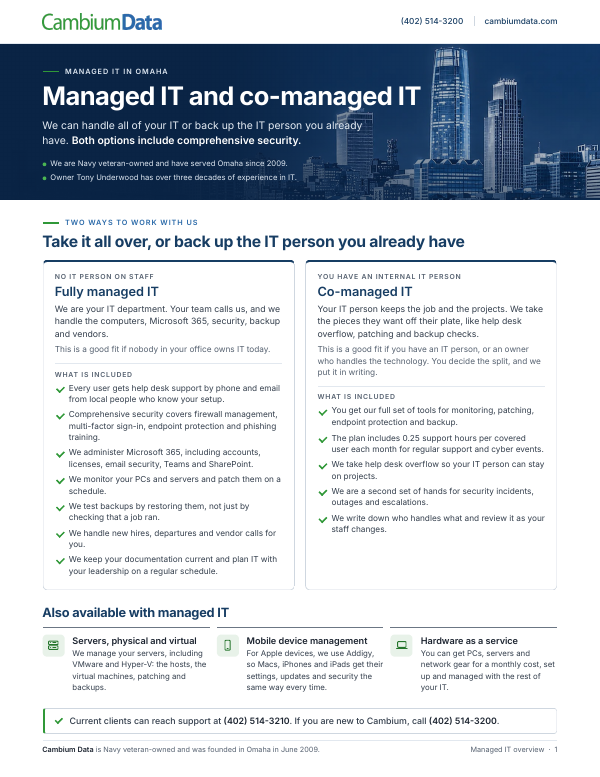
Managed IT Overview
This overview explains how our managed IT and co-managed IT services work for Omaha businesses.
Download the PDFStart with a free technology and AI review
We look at your setup and what you pay today, then show you what is not protected and which repetitive office work AI employees could take over.